

Installing local LLMs on Raspberry Pi CM5 and benchmarking performance
At blackdevice we constantly push small hardware platforms to see how far they can really go. This time we focused on our own Pi Hack carrier board paired with a Raspberry Pi Compute Module 5 (CM5), 8GB RAM and a 256GB NVMe SSD. The goal was simple: install Ollama, run several lightweight local language models (LLMs), and compare how they behave when fed the same prompts. The promise of running models locally is tempting — privacy, offline work, full control — but how does that promise translate into real-world responsiveness and usefulness on constrained hardware? Spoiler: some models are great; others quickly prove impractical. In this article we’ll walk you through the installation, the tests we ran, the raw stats the LLMs returned, and a model-by-model conclusion of what we actually experienced.
What’s Ollama
Ollama is a command-line–driven local LLM runner. Instead of relying on cloud APIs, we download models directly to the machine and interact with them through the terminal. For our workflow, this has two advantages:
- Everything stays local and offline.
- The entire installation, loading and inference process is transparent.
Given the experimental nature of our Pi Hack board, Ollama is a perfect match for quick, controlled model testing.
Hardware & initial setup
Hardware used
- Pi Hack carrier board (for Raspberry Pi Compute Module 5)
- Compute Module 5 (CM5) — 8 GB RAM
- NVMe SSD — 256 Gb, connected via M.2
- PoE for network + power
Imaging the disk
- Use
rpi-bootto expose the eMMC/NVMe as an external mass-storage device to your host machine. - Use Raspberry Pi Imager to flash the 64-bit Raspberry Pi OS onto the NVMe SSD so the Pi will boot from it.
Initial boot
- Connect monitor + keyboard and PoE cable for first boot.
- Once booted, obtain local IP and SSH from your computer.
Installing Ollama on our Pi Hack
Run these commands:
- Update the system and install basic tools
sudo apt update && sudo apt upgrade -y
sudo apt install -y curl wget jq git ca-certificates - 2. Install Ollama
curl -fsSL https://ollama.com/install.sh | sh - 3. Confirm the service status with:
ollama --version
sudo systemctl status ollama
How we benchmarked: the experiment design
To compare models fairly, we defined a simple and repeatable testing procedure. Each model received the exact same prompts and was executed with --verbose so we could collect statistics.
- Prompt 1. Translation: Translate to english the following sentence written in spanish: Probar modelos de inteligencia artificial en local nos permite compararlos y comprobar el rendimiento en diferentes dispositivos.
- Prompt 2. Historical milestones: Choose three historical milestones in the history of science and arrange them from the oldest to the most recent.
These two tasks reveal essential differences: basic language understanding, structure, and generation speed. Every model was pulled and executed on the Raspberry Pi CM5 (8GB RAM + NVMe) under identical conditions. The tasks were designed to be simple enough for these light LLMs.
Models tested
We evaluated a range of lightweight models accessible through Ollama:
- TinyLlama 1.1B
- Deepseek R1 — 1.5B, 7B and 8B
- Gemma3 — 270M, 1B and 4B
- Phi-4 mini reasoning — 3.8B
For each one, we ran both prompts and analyzed the output and the raw performance metrics.
Models tested, with the exact run commands used:
tinyllama(TinyLlama 1.1b) —ollama run tinyllama:1.1b --verbosedeepseek-r1:1.5—ollama run deepseek-r1:1.5 --verbosedeepseek-r1:7b—ollama run deepseek-r1:7b --verbosedeepseek-r1:8b—ollama run deepseek-r1:8b --verbosegemma3:270m,gemma3:1b,gemma3:4b—ollama run gemma3:<size> --verbosephi4-mini-reasoning:3.8b—ollama run phi4-mini-reasoning:3.8b --verbose
Model-by-model raw results and commentary
Deepseek R1: 1.5B
Quality: Fast but poor quality. Translation misunderstood “en local” and treated it like a physical locality. Historic milestones returned are imprecise and with wrong ordering/dates.
Stats (prompt 1):
- total duration: 25.00 s
- load duration: 222.91 ms
- prompt eval count: 40 token(s) — prompt eval duration: 1.87 s (21.37 tokens/s)
- eval count: 261 token(s) — eval duration: 22.60 s (11.54 tokens/s)
Stats (prompt 2):
- total duration: 58.653 s
- load duration: 208.187 ms
- prompt eval count: 23 token(s) — prompt eval duration: 0.992 s (23.17 tokens/s)
- eval count: 641 token(s) — eval duration: 56.703 s (11.30 tokens/s)
Conclusion: Too inaccurate for practical use despite modest speed.
Deepseek R1: 7B
Quality: Much slower and still gives poor or confused answers. The model spends lots of time (long loops) and the output quality doesn’t justify the time.
Stats (prompt 1):
- total duration: 2 m 9.477 s (≈129.48 s)
- load duration: 227.324 ms
- prompt eval count: 40 — prompt eval duration: 8.961 s (4.46 t/s)
- eval count: 294 — eval duration: 1 m 59.887 s (≈119.887 s) (2.45 t/s)
Stats (prompt 2):
- total duration: 11 m 7.088 s (≈667.09 s)
- load duration: 224.595 ms
- prompt eval count: 23 — prompt eval duration: 4.734 s (4.86 t/s)
- eval count: 1473 — eval duration: 11 m 0.373 s (≈660.37 s) (2.23 t/s)
Conclusion: Too slow for the CM5 8GB; poor time-to-quality tradeoff.
Deepseek R1: 8B
Quality: Better than 7B for quality, but still very slow — answers are acceptable but too slow to be useful.
Stats (prompt 1):
- total duration: 2 m 35.038 s (≈155.04 s)
- load duration: 252.184 ms
- prompt eval count: 39 — prompt eval duration: 9.297 s (4.19 t/s)
- eval count: 295 — eval duration: 2 m 25.208 s (≈145.21 s) (2.03 t/s)
Stats (prompt 2):
- total duration: 6 m 42.290 s (≈402.29 s)
- load duration: 216.430 ms
- prompt eval count: 21 — prompt eval duration: 4.802 s (4.37 t/s)
- eval count: 769 — eval duration: 6 m 36.656 s (≈396.66 s) (1.94 t/s)
Conclusion: Slow; 8B can be run but it’s borderline practical — quality improved vs smaller Deepseek models, but still not great relative to time cost.
Gemma3: 270M
Quality: Very fast, literal but correct; good for very simple tasks. Excellent performance on CM5.
Stats (prompt 1):
- total duration: 1.416 s
- load duration: 264.957 ms
- prompt eval count: 40 — prompt eval duration: 0.161 s (≈248.5 t/s)
- eval count: 24 — eval duration: 0.898 s (≈26.7 t/s)/li>
Stats (prompt 2):
- total duration: 12.205 s
- load duration: 258.755 ms
- prompt eval count: 28 — prompt eval duration: 0.104 s (≈269.0 t/s)
- eval count: 284 — eval duration: 11.295 s (≈25.1 t/s)
Conclusion: For tiny models the throughput is superb; answers are usable, at least for simple tasks.
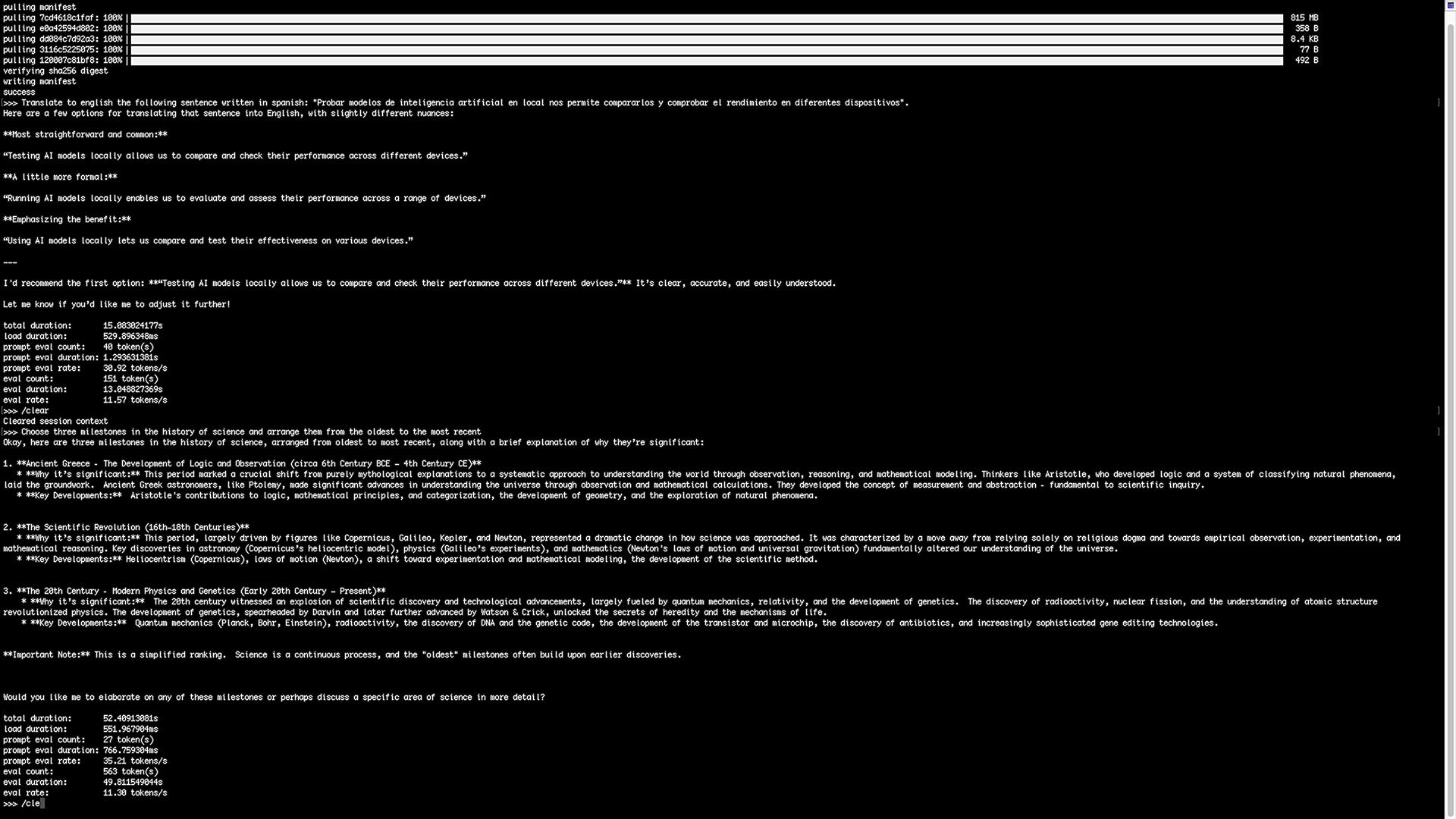
Gemma3: 1B
Quality: Very good quality for size; returns multiple translation options and a strong recommendation. Good balance of speed and response richness.
Stats (prompt 1):
- total duration: 15.083 s
- load duration: 529.896 ms
- prompt eval count: 40 — prompt eval duration: 1.293 s (30.92 t/s)
- eval count: 151 — eval duration: 13.048 s (11.57 t/s)
Stats (prompt 2):
- total duration: 52.409 s
- load duration: 551.967 ms
- prompt eval count: 27 — prompt eval duration: 0.767 s (35.21 t/s)
- eval count: 563 — eval duration: 49.811 s (11.30 t/s)
Conclusion: Excellent performer on CM5 — high quality with acceptable latency for many local tasks.
Gemma3: 4B
Quality: Slower than 1B but still solid and more detailed. For our test prompts the 1B often sufficed and returned faster answers; 4B costs more time to load/generate.
Stats (prompt 1):
- total duration: 1 m 10.156 s (≈70.16 s)
- load duration: 536.921 ms
- prompt eval count: 40 — prompt eval duration: 4.529 s (8.83 t/s)
- eval count: 251 — eval duration: 1 m 4.728 s (≈64.73 s) (3.88 t/s)
Stats (prompt 2):
- total duration: 2 m 53.720 s (≈173.72 s)
- load duration: 537.524 ms
- prompt eval count: 28 — prompt eval duration: 2.750 s (10.18 t/s)
- eval count: 639 — eval duration: 2 m 49.515 s (≈169.51 s) (3.77 t/s)
Conclusion: Good quality but heavier than necessary for the simple prompts tested; 1B is often the sweet spot.
TinyLlama: 1.1B
Quality: Fast but unreliable. Failed the translation in one test and the historical list was imprecise. Slightly better than Deepseek R1 small models but still inferior to Gemma3.
Stats (prompt 1):
- total duration: 5.285 s
- load duration: 83.223 ms
- prompt eval count: 77 — prompt eval duration: 2.880 s (26.73 t/s)
- eval count: 39 — eval duration: 2.298 s (16.97 t/s)
Stats (prompt 2):
- total duration: 15.123 s
- load duration: 93.980 ms
- prompt eval count: 57 — prompt eval duration: 1.240 s (45.95 t/s)
- eval count: 244 — eval duration: 13.706 s (17.80 t/s)
Conclusion: Quick but too noisy / inaccurate for reliable usage.
Phi-4 mini reasoning: 3.8B
Quality: The model attempts deep reasoning, but it’s very slow and for our simple tasks spends excessive time (even looping on the second prompt). Final answers can be correct but the time cost is prohibitive.
Stats (prompt 1):
- total duration: 2 m 32.606 s (≈152.61 s)
- load duration: 277.632 ms
- prompt eval count: 48 — prompt eval duration: 5.185 s (9.26 t/s)
- eval count: 453 — eval duration: 2 m 26.460 s (≈146.46 s) (3.09 t/s)
Stats (prompt 2):
- total duration: 10 m 38.034 s (≈638.03 s)
- load duration: 267.611 ms
- prompt eval count: 36 — prompt eval duration: 2.339 s (15.39 t/s)
- eval count: 1783 — eval duration: 10 m 32.768 s (≈632.77 s) (2.82 t/s)
Conclusion: Not practical on CM5 8GB for these tasks.
AI model benchmark results on Raspberry Pi hardware
| Model (size) | Prompt 1 total | Prompt 2 total | Quality (summary) | Suitable on CM5? |
|---|---|---|---|---|
| Gemma3 (270M) | 1.42 s | 12.21 s | Fast, literal but correct | Yes (excellent) |
| Gemma3 (1B) | 15.08 s | 52.41 s | Very good quality, good balance | Yes (recommended) |
| Gemma3 (4B) | 70.16 s | 173.72 s | Good but slower | Maybe (if you accept latency) |
| Deepseek R1 (1.5B) | 25.00 s | 58.65 s | Fast but poor quality | No |
| Deepseek R1 (7B) | 129.48 s | 667.09 s | Very slow, poor | No |
| Deepseek R1 (8B) | 155.04 s | 402.29 s | Slow, better quality | No (too slow) |
| TinyLlama (1.1B) | 5.29 s | 15.12 s | Fast, unreliable | No (quality) |
| Phi-4 mini (3.8B) | 152.61 s | 638.03 s | Slow, loops | No |
Conclusion
In this post, we set out to evaluate how several lightweight language models perform on hardware that was never intended for AI workloads. The results were clear: while all models worked, Gemma3 delivered a level of speed and efficiency that genuinely surprised us. Running these models locally on a minimal setup helps us understand their real-world behavior, their limits, and their practical value for small, embedded systems.
This test is also an important baseline for future comparisons. By running the same models with the same prompts on different devices, we’ll be able to evaluate new hardware more objectively and measure how each platform really performs under identical conditions.
Thanks for reading! If you want to follow our tests, projects, and tutorials, make sure to visit our blog, subscribe to our mailing list for updates, and check out the video versions on our YouTube channel.